Open a tab, type "what is my ip" into Google, and you get a number. Done, right?
Not quite. That number is the start of a surprisingly long story — about who your provider is, roughly where you're sitting, and how much a random website can work out about you before you've clicked a thing.
We build and run a handful of IP tools here, so we've stared at a lot of these numbers. Let's unpack what they actually mean.
The short answer
Your IP address is the return address for your internet traffic. Load a page, and your request goes out stamped with an IP; the response comes back to it. No IP, no reply. It's that fundamental.
There are two flavors:
- IPv4 — the classic
203.0.113.42style. Four numbers, 0–255 each. The world has very nearly run out of these, which is the entire reason the next one exists. - IPv6 — the long hexadecimal monsters like
2001:db8:85a3::8a2e:370:7334. Ugly to type. But there are enough of them to label every grain of sand on Earth and not run low.
The widget on our homepage tells you which one you're on right now. Most home connections still hand out IPv4; plenty of mobile networks have quietly switched to IPv6.
Gut-check: dots mean v4, colons mean v6.
Public vs. private — the part that trips everyone up
This is where the "what is my IP" search gets muddy. The address a search result shows you is your public IP — the one the outside world sees, usually shared by every device on your router through NAT.
The 192.168.x.x or 10.x.x.x address on your laptop? That's private. It means something only inside your own network. Nothing on the public internet can reach you on it, and no website will ever see it.
This trips people up constantly. Someone pastes 192.168.0.14 into a checker and wonders why it returns nothing useful. So our tools flag reserved and private ranges explicitly — feed them a non-routable address and they say so, instead of pretending. If you want to see which ranges count as private and carve up a subnet yourself, the IP calculator does the bit-math for you.
What your IP quietly reveals
Worth slowing down for. An IP on its own is just a number — but it's a number that's been assigned, documented, and routed, and all of that is public record.
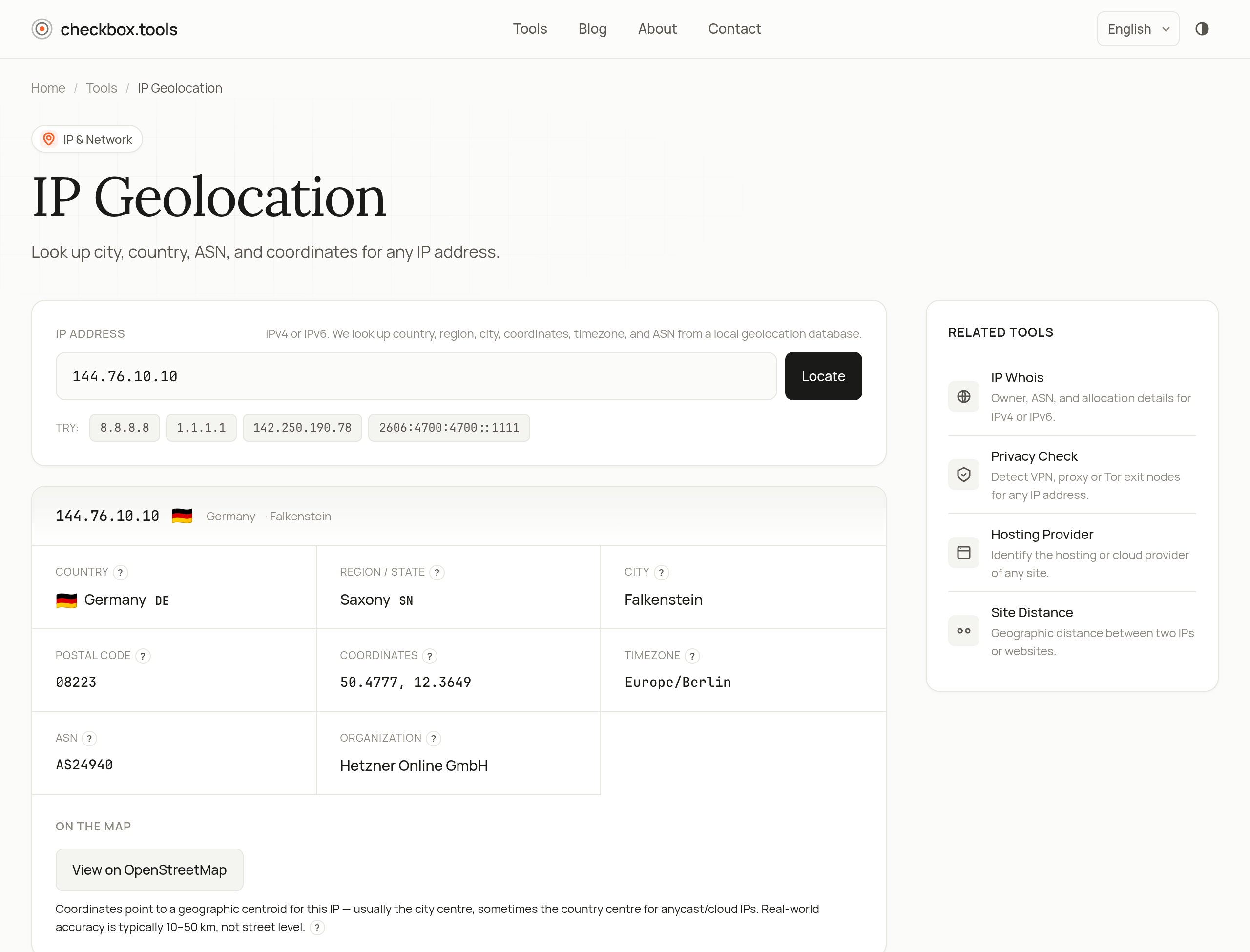
Run an address through our IP geolocation tool and you'll typically get country, city, approximate coordinates, a timezone, and the network operator behind it.
A word on accuracy, because it's wildly overhyped. Geolocation is a best-effort lookup against a local geolocation database we sync monthly — not GPS, not magic. Country-level accuracy is excellent. City-level is decent in dense cities and frankly a coin-flip in rural areas; it can land you a town or two from where you actually are. So when a site greets you with "Hello, visitor from [wrong city]" — now you know why.
Who owns the network: WHOIS and ASNs
Geolocation tells you where. IP WHOIS tells you who.
Every public IP sits in a block that some organization registered with a regional registry — ARIN for North America, RIPE for Europe, APNIC for Asia-Pacific, and so on. Our WHOIS tool queries those registries directly over the old-school port-43 protocol (IANA referral first, then the right registry) and pulls back:
- The CIDR block the IP lives in, e.g.
203.0.113.0/24 - The organization that registered it
- An abuse contact — the address you'd email if that IP is hammering your server
- Registration and last-updated dates
That abuse contact is genuinely useful, not just trivia. A while back, one IP spent days hammering our server's SSH — hundreds of login attempts an hour. We looked it up on WHOIS, saw the block belonged to a small European host, and sent its abuse address a couple of lines with a snippet of the logs. No magic followed, but three days later a terse "the customer has been notified" landed in our inbox, and the knocking stopped. Sometimes that's enough.
A real person, or a data center?
Often the more interesting question. A home connection and an AWS instance behave nothing alike, and you can usually tell them apart.
Our hosting-provider tool leans on two signals: the organization name attached to the IP's ASN, and the reverse-DNS name of the address itself. When both line up — the ASN says "Amazon," the hostname ends in .amazonaws.com — it flags the result as high-confidence hosting. An ASN match alone is medium-confidence. No match usually means a residential connection.
Better yet, it doesn't just say "hosting or not" — it tells you which kind: a big cloud like AWS or Google Cloud, a content-delivery network, a cheap VPS, or an ordinary home connection. The distinction matters in practice. See an unfamiliar IP in your logs and can't tell whether it's a real visitor or a bot running on a server rented for four dollars? Run it through the tool and it's immediately clear.
And if the real question is whether someone's hiding behind a VPN, proxy, or Tor exit, that's a separate detection tool.
"Can someone find my home address from my IP?"
Short version: no. Not from the IP alone.
The most a website gets is the geolocation above — city-ish, plus your provider. Your actual street address sits with your ISP, behind a legal process. Police with a warrant can get it. A forum admin with a grudge cannot.
That said, you are identifiable enough that we take it seriously on our end. Concrete example of practicing what we preach: when you run any of our IP tools, we never store your raw IP. It's hashed with HMAC-SHA256 before it ever touches a log, and the recorded target is masked to a /24 block for IPv4 (or /64 for IPv6). Our analytics can tell that an address was checked, and roughly from where — but can't reconstruct which one. That wasn't a compliance checkbox; it's the default we wanted as users ourselves.
Finding your IP, the quick version
- Fastest: the widget on our homepage shows your public IP, its version, and geolocation the moment the page loads.
- From a terminal:
curl ifconfig.meorcurl ipinfo.io/ipreturns the bare address. - On your router: the "WAN" or "Internet" status page shows the public IP your whole household shares.
One catch: your public IP probably isn't permanent. Most ISPs hand out dynamic addresses that rotate now and then — rebooting the router is often enough to get a fresh one. Need a fixed address for hosting something or getting whitelisted at work? That's a static IP, usually a paid add-on.
The takeaway
Your IP isn't a secret, but it isn't your identity either. It's a routing label that happens to leak your rough location and your provider — handy to know, not worth losing sleep over. Check yours on the homepage, and if a specific address is bugging you, run it through WHOIS to see who's really behind it.
— the checkbox.tools team