Something's broken. The site won't load, email is bouncing, or you changed a record an hour ago and nothing's happening. Nine times out of ten the answer is sitting in the DNS — you just have to know how to look.
DNS is the internet's address book: it turns example.com into an IP your browser can actually connect to. When it misbehaves, everything downstream looks broken even though the server is fine. Let's go through how to read it properly.
The records worth knowing
You don't need them all memorized. These are the ones that come up:
| Record | What it does | When it bites you |
|---|---|---|
| A | Maps a name to an IPv4 address | Site points at the wrong/old server |
| AAAA | Same, but IPv6 | IPv6 users can't reach you |
| MX | Where email for the domain goes | Mail bounces or vanishes |
| TXT | Free text — SPF, DKIM, verification | Email lands in spam; verification fails |
| NS | Which nameservers are authoritative | The whole domain resolves wrong |
| CNAME | An alias pointing one name at another | A subdomain won't resolve |
| SOA | Admin metadata for the zone | Rarely — but it names the primary NS |
| CAA | Which CAs may issue certs for you | Certificate issuance gets refused |
Our DNS lookup tool queries all ten types it supports — A, AAAA, MX, TXT, NS, CNAME, SOA, CAA, SRV and PTR — against your choice of Google (8.8.8.8), Cloudflare (1.1.1.1) or Quad9 (9.9.9.9), and shows the raw dig-style output with TTLs intact. You're reading the same thing a sysadmin sees in a terminal.
Spot an A record pointing at an IP you don't recognize? IP WHOIS tells you who owns it in seconds.
TTL: the number everyone ignores until it matters
Every record carries a TTL — time to live, in seconds. It's how long resolvers are allowed to cache the answer before asking again. A TTL of 3600 means "trust this for an hour."
This one number explains most "my DNS change isn't working" panic. A simple example: you fix an A record at 12:00, but its TTL is 86400 (a full day). Resolvers that queried your domain at 11:30 keep handing back the old IP for almost 24 more hours — so for some users the site only "moves" the next day. Nothing broke; you just told them they could cache that answer for a day.
The practical rule we follow: lower the TTL a day before you plan to change a record. Drop it to 300 seconds, wait for the old high TTL to expire, then make the change. Now the switch propagates in minutes instead of a day. Raise it back afterward so resolvers aren't constantly re-querying your nameservers.
"I changed it — why isn't it live?"
Because DNS has no update button. There's no central server to push to. Your authoritative nameserver has the new value instantly — but every resolver that already cached the old one keeps serving it until its TTL runs out. And different resolvers, in different countries, expire at different moments.
That's exactly why we built the DNS propagation checker the way we did. Instead of asking one resolver and calling it a day, it fires the same query at 15 public resolvers spread across the world, in parallel — Google and Cloudflare in the US, Quad9 in Switzerland, Mullvad in Sweden, CZ.NIC in Czechia, Alibaba and DNSPod in China, and more. You watch the new record light up region by region as caches expire. When all 15 agree, you're genuinely propagated.
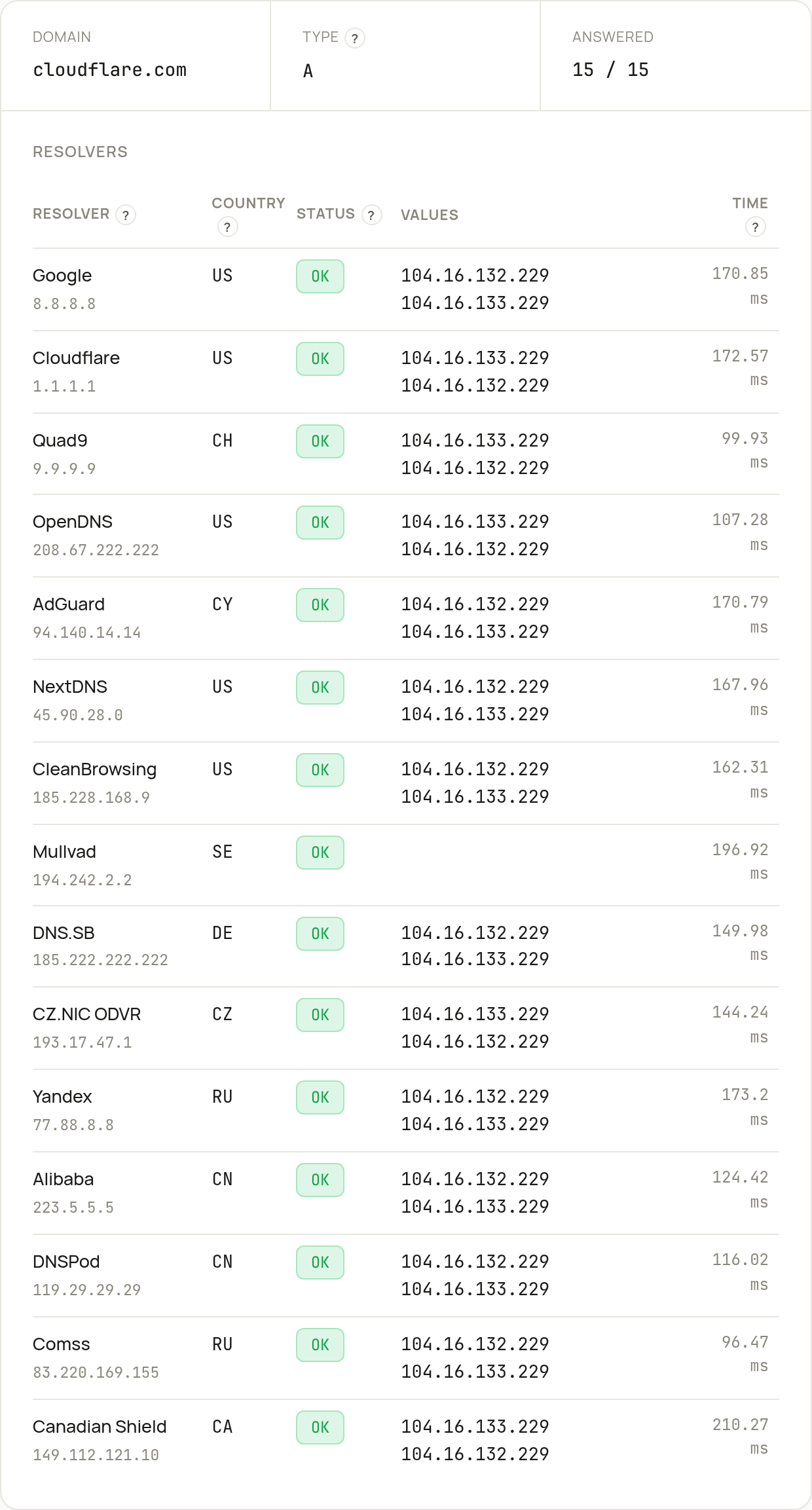
Rule of thumb: "propagation" isn't the internet being slow. It's caches honoring the TTL you set.
When the resolver itself is the problem
Sometimes the records are correct everywhere and the site is still sluggish to resolve. That points at resolver latency, not record values.
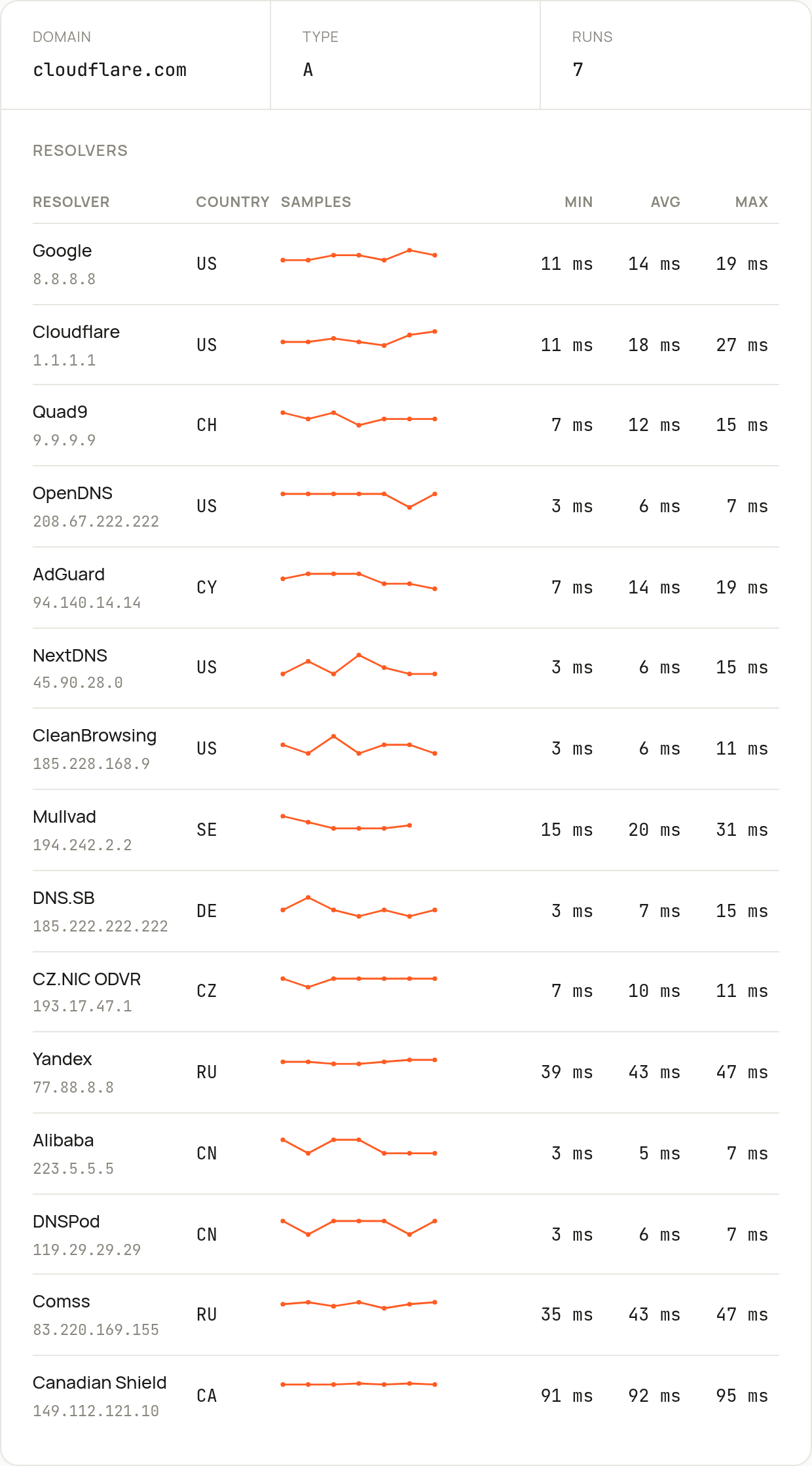
Our DNS response-time tool measures exactly that: it runs dig against those same 15 resolvers, several times each, and reports the min, max and average query time per resolver. If your users sit in Germany and your nameservers answer Frankfurt in 8 ms but Sydney in 280 ms, that's a real, measurable signal — maybe it's time for an anycast DNS provider.
Who controls the zone: WHOIS and nameservers
If the NS records look wrong, the question becomes who set them. Domain WHOIS gives you the registrar, the registration and expiry dates, the domain's status codes, whether DNSSEC is on, and — crucially — the nameservers the registry has on file.
One thing worth knowing, because cheaper tools get it wrong: a lot of newer extensions like .tools, .app and .dev don't run a traditional WHOIS server at all. Query them the old way and you get nothing back. Our lookup falls back to RDAP — the modern JSON-based replacement — automatically when it detects a thin or missing WHOIS response, so a .tools domain returns the same structured result a .com does. We hit this on our own domain, actually. The fix became a feature.
If the registry's nameservers don't match what you set at your DNS host, you've found your bug: the domain is pointing somewhere else entirely, and no record edit will help until the NS delegation is fixed.
A quick checklist when DNS "isn't working"
- Look up the record you changed with the lookup tool. Is the new value even there?
- Check the TTL. High? You're just waiting on cache expiry.
- Run a propagation check. Mixed results across regions means caches are still expiring; consistent everywhere means it's live.
- Verify the NS records against your DNS host with WHOIS. A delegation mismatch is the real culprit more often than you'd think.
- Still slow? Measure resolver response time before blaming your app.
The takeaway
Most DNS "outages" aren't outages. They're TTLs doing exactly what you told them to, or a delegation pointing somewhere you forgot about. Read the records, respect the TTL, and check propagation across more than one resolver before you conclude anything. Start with a lookup — the answer is usually right there in the output.
— the checkbox.tools team